Can you export your Bubble app? Yes. But not as code.
There is an export button on Bubble. Most founders never find it, and it does not do what they hope.
App file management
Bubble apps can contain unused items that make the app bigger over time. Click here to clean unused properties for better performance.
Go to Settings, then General, and scroll to the bottom. You can download your whole app as a JSON file. Pages, workflows, settings, all of it. You need a Growth plan or above.
Open that file and you will find a complete description of your app in a proprietary format that Bubble has defined.
You will not find real code here. And that is because...
Your Bubble app is not code. It is a list of settings.
Bubble stores your settings. Someone opens your app. Bubble reads those settings and builds the page, right then. It does this every time.
That JSON file is the list of settings. There is no HTML in it. No JavaScript. Nothing that can just run out of the box.
So if you hand that file to a developer, they can't start your app.
It does let a developer read exactly what your app does though, exactly as specified on the Bubble editor. That difference is the whole point.
- Your app structure, as that JSON file. Covers pages, workflows, settings, option sets, app texts.
- Your data. Every table exports to a CSV file.
- Your uploaded files.
- Anything that runs without Bubble.
This is not Bubble being unfair to you or hiding your IP. There was never a working copy of your app to hand over. The settings and the Bubble runtime are the same product.
{"pages":{"AAW":{"elements":{"bTGyy0":{"properties":
{"height":720,"left":0,"top":0,"width":1080,"zindex":2,
"order":1,"row_gap":32,"use_gap":true,"column_gap":0,
"fit_height":true,"margin_top":100,"margin_left":20,
"margin_right":20,"single_width":false,"margin_bottom":100,
"single_height":false,"min_height_css":"0px",
"horiz_alignment":"flex-start","container_layout":"column",
"container_horiz_alignment":"center"},"type":"Group",
"id":"bTGyM0","current_parent":"AAL.elements",
"default_name":"Group D","elements":{"bTHDD":{"properties":
{"height":293,"left":330,"top":8,"width":420,"zindex":11,
"order":2,"row_gap":24,"use_gap":true,"fit_height":true,
"padding_top":24,"padding_left":24,"single_width":false,I do not use this file for rebuilds, and here is why
Founders sometimes offer it to me. I say no.
That file is written in Bubble's own format. It describes one thing: how somebody chose to build this app inside Bubble. Every workaround. Every compromise. None of it tells me what your product is supposed to do. It only tells me how you decided to implement that on Bubble. And everyone who builds on Bubble has their own style of getting things to work.
But there is a bigger problem. What sits in your Bubble app is often not what you wanted in the first place. It is what you managed to build. Working from that file means copying a copy of your original idea, and each copy loses valuable information.
So I ask you instead. That is what stages 1 and 2 below are for.
One caution before you send that Bubble file anywhere.
Bubble's terms cover what you may do with it. Opinions differ on whether using it to rebuild your app elsewhere is allowed, and none of them quote the actual clause from the TnC. Terms change constantly, so check out the latest ones from Bubble. If a company asks you to hand it over, read the terms first, and take legal advice if the answer matters to you. My process does not touch that file, so it never comes up.
Some companies will read that JSON file and write code from it. This costs around $1,500 to $5,000.
Be clear about what you get. They blindly copy what your app does today inside Bubble. That includes all the odd things you built to get around Bubble's limits. Those limits are irrelevant when you leave Bubble. And often they lead to unexpected behavior when moved to custom code.
More on why that matters below.
Should you move off Bubble?
Two questions decide this.
Can Bubble do what your product needs? And is your bill a Bubble problem or a build problem?
First, how Bubble charges you
Bubble charges for server work in workload units (WUs). Every search, every page load, every workflow consumes some.
The Growth plan includes 250,000 WUs a month. After that you pay $0.30 per 1,000 WUs.
This bill does not grow with your revenue. It grows with your traffic. And it grows much faster if your app was built inefficiently (which is very often the case).
That last part matters. A high bill is often a build problem, and build problems are cheap to fix.
Signs it is time to leave
1. Your app uses a lot of data or frequent polling.
Think of a dashboard for IoT devices, like fleet management. Or hardware sending data back to your app every few minutes. Each one of those are API calls that cost workload units. You cannot optimise this away. Bubble just isn't the right place to build this.
2. You move large files.
Bubble caps API responses at 50MB. If your product moves video or large images around, you will meet that limit quickly.
3. You need something Bubble cannot do.
Tasks that run for several minutes or more. Socket connections that stay open. Live updates between users. Complex custom scripts. Cache management. Offline functionality. And a lot more.
4. You are near your storage limit.
Every plan has one. Apps with lots of images or video reach it fast.
5. You cannot control your own injected code.
You can write a plugin for almost anything. But Bubble decides where your code goes and how it runs. You do not.
6. You are tired of fixing the same things.
Bubble apps get slower and messier with age. If you are already spending money or time every month keeping yours healthy, that cost does not go away. It grows. See what it costs to keep running, below.
None of these are bugs. None of them get better if you try harder. This is just how the platform works.
Signs it is too early
1. You want lower running costs, and your app is very inefficiently built.
4 common culprits for high WU consumption:
- A search inside the filter of another search.
- Long lists shown on one page, with no pagination.
- A database designed without thinking about the searches that run against it.
- Advanced filters on searches (usually because of #3)
These are fixable inside Bubble, for less than the cost of migrating to custom code. Check this before you do anything else.
2. Your app works but nobody uses it.
Then it is a prototype, whatever you paid for it. Spend the money finding out if people want it.
3. You are happy to maintain it yourself.
Bubble apps get slower and messier as they age. Some founders are fine with that and will fix the basics themselves as they appear. If that is you, stay. The cost section below explains what you are signing up for.
I would rather tell you this now than watch you regret it in four months.
Not sure which one you're dealing with?
Start with a free scan of your app. Often a high bill is a build problem that one fix solves, so you may not need a rebuild at all.
See how I fix Bubble apps →What a rebuild costs and how long it takes
| Range | Factors that affect it | |
|---|---|---|
| Rebuild (migration) | $4,000 to $15,000 | Users you plan for, number of features, outside services, testing |
| Time to launch | 3 weeks normal, 5 weeks complex | Same, and testing is the biggest factor |
| Hosting and upkeep after launch | From $150 a month | How many users you have, outside services, fixes when you need them |
Not included: your hosting and database costs after launch, other infrastructure to run it, any paid APIs you use, and anything outside the agreed spec. Running costs are usually much lower post migration.
Complexity is not just the number of pages
Two apps can have the same feature list and cost very different amounts.
What changes the price is how many users you are building for. An app for 5,000 users and an app for 100 million are different engineering problems with the same description.
And the thing that stretches a timeline is not writing features. It is testing them properly, from start to finish.
What it costs to keep running
Most comparisons stop at the build price. The bigger number is what you pay over the next three years.
I have taken 120 apps live, on Bubble and on custom code. Custom code costs less to keep running. Here is the mechanism.
The same fix takes longer on Bubble.
A problem that takes thirty minutes to find and fix in code will often take a Bubble developer two to three hours. Four to six times the work, for the same result (except on Bubble, this issue might resurface soon).
Decent Bubble developers charge on average $40 an hour. So the lower rate does not save you money. You are simply buying more hours.
And one fix is rarely one fix.
Here is a real example. An AI feature on a Bubble app of mine stopped working correctly. Took 3 hours to sort out.
Some of that was a Bubble quirk. Bubble will not accept line breaks in the body of an API call sent from a workflow, and that is the sort of thing you find by hunting rather than by reading an error message.
The rest was the expensive part. The API integration needed to be reconfigured for a new use case. That same API was called in several places around the app. Each instance had to be found and changed by hand, one at a time.
In code, that logic lives in one function. You change the function once. Then you check the places it gets called, which takes minutes.
On a small app the difference is small. It grows with every feature you add.
Bubble apps also get worse as they age.
Your database fills up with redundancies (described in the next section). Every new feature adds more of them. Searches that were fine at 5,000 rows are painfully slow at 500,000. Your workload unit bill climbs in months even when your traffic does not.
Nocode is inherently prone to compounding tech debt by definition. You have to revisit the app at an architecture level at very frequent intervals of scale to keep the app efficient.
A custom app is closer to set and forget.
It still needs someone who knows what they are doing, now and then. Now and then is a huge difference.
This is what founders miss when they compare a $5,000 Bubble build against a $5,000 rebuild for example. You are not comparing two prices. You are comparing one price against a price, plus a subscription, plus somebody's hours every month (potentially yours), for as long as the app exists.
About the $50,000 agency quote
If someone quoted you $50,000 and seven months for an app that is not truly complex, please get the Go-Live Plan first. I will tell you what the app really needs.
That is not what software costs in 2026. Almost all of what founders bring to me gets built well in under $15,000. And these are usually builds for approximately 1,000 to 100,000 users and average complexity. There are outliers of course, so those should be discussed separately.
There is one exception here. Some work carries real safety or massive potential legal liabilities. That spend is fair in such cases, and honestly, that's something you should hire a big agency for.
What gets reused, and what gets rebuilt
| Part of your app | What happens | How difficult |
|---|---|---|
| Data | Export to CSV, then load into the new database | Easy for small data. A little more work above ~200,000 rows. |
| Files | Download, then upload to new storage | Easy, just takes patience |
| User accounts | Accounts move. Passwords cannot. | Easy, but your users must re-define passwords |
| Business logic | Rebuilt from the spec | This is the real work |
| Pages and design | Rebuilt, almost always improved | Medium |
| Plugins | Replaced with code or libraries | Depends on complexity |
| Privacy rules | Rewritten as database RLS rules | Medium, and the interesting part |
Your users will all have to reset their passwords
There is no way around this. Plan for it now.
Bubble scrambles passwords so they cannot be turned back into the original. This is a correct security measure. It also means nobody can read them. Not you. Not Bubble. Not me.
So passwords cannot be exported, because they cannot be recovered.
Anyone who tells you they can move your passwords has not done a migration.
What happens in practice: accounts move across normally. On the day of, each user sets a new password.
So I recommend sending an email to users informing them of this. Write it carefully. A confused user is a user who leaves.
This risk of losing users grows with your user count. It is one of the few honest reasons to move sooner rather than later.
Moving your data: simple under 200k rows, batched beyond it
I have run migrations where the data was small. I exported CSV files, ran one script, and loaded everything in one go. It was smooth because it was small.
For migrations above 200,000 rows it changes. You load in batches, or split the export into smaller files. More time, more care, all depending on the actual nature of the data.
But data is rarely the risky part. If someone tells you data movement is the big risk, they are either working at huge scale or selling you something.
The database problem nobody talks about
In short: a big part of an old Bubble database is not your business at all. It is copies of data, added only to work around Bubble. Custom code lets you delete them.
This is the part that decides whether your rebuild is worth doing. Almost nobody writes about it.
On Bubble, the mess ends up in your database.
Here is why. Say you run a marketplace. You have sellers. Sellers have products. Products have reviews.
Normally a review links to a product. The product links to a seller. To find out which seller a review belongs to, you follow the links.
Bubble cannot do this safely.
Bubble's privacy rules protect one record at a time. A rule on a review can look at that review. It cannot follow the link to the product and then to the seller. So you copy the seller onto the review. Now the rule can see it. Then you do it again. And again. On every table.
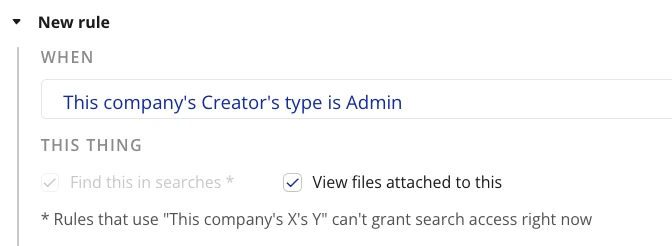
There is a second reason too. Searching across two links is slow in Bubble. So you shape your data around your screens instead of around your business.
Privacy rules force a top-down order. The seller gets copied down into every table below it.
Each table links to the next. No copies. The rule follows the link.
Bubble forces the complexity into your database. Postgres lets it live in your security rules.
In custom code, your security rules are simple to read and change
In short: your security rules move out of your database and into one place you can actually read and test, instead of being copied across dozens of tables.
Postgres is the database foundation most custom apps use. I use Supabase a lot, and they use it as well.
In Postgres, following links is cheap. So you delete the copies. Your database goes back to describing your actual business.
Your security rules move too. In Postgres they sit in one place, next to the data. You can read them. You can test them. You can change one rule instead of hunting through twenty tables.
So you'll see RLS rules replacing Bubble Privacy Rules. Here's an example:
See the actual security rule →
CREATE POLICY "Sellers can view their own product reviews"
ON reviews
FOR SELECT
USING (
  EXISTS (
    SELECT 1 FROM products
    WHERE products.id = reviews.product_id
    AND products.seller_id = auth.uid()
  )
);
Why a clean database is cheaper to maintain
A database that describes your business is cheaper to change.
New features stop requiring you to update the same fact in six places. Bugs stop hiding in copies that fell out of sync. A developer you hire in two years can read it and understand your business in minutes.
This is also why the $1,500 copy service is the wrong tool for most apps. It copies your database exactly as it is today. Every workaround comes with it. You pay to carry Bubble's problems into a system that never had them. In fact, these workarounds lead to bugs and avoidable tech debt.
I do not copy your Bubble app. I rebuild your product.
Your Bubble app becomes the most detailed spec I could ever ask for.
Case study
I built the same app three times. Here's what I learned.
An AI image-processing app. Users upload photos and the app runs AI jobs on them in batches. It has been built three times over the last year.
| Built on | Time | Cost | |
|---|---|---|---|
| Version 1 | Bubble | 4 months | $6,000 |
| Version 2 | Bubble, rebuilt and redesigned | about 3 months | $4,500 |
| Version 3 | Next.js, Supabase, Vercel | 3 weeks | ~$4,000 |
The honest comparison: ~14 weeks on Bubble v/s 3 weeks with code
Three weeks against three months looks like four times faster. It is not that simple, so here's the math.
Version 3 was quicker partly because two versions already existed. Discovery and design took three days instead of weeks. The design was already settled.
But version 3 also shipped more features than version 2. Admin controls for the AI prompts. Deeper analytics. Caching. Crash logging. Building those in Bubble even with inherent limitations would have added at least two more weeks.
So the fair comparison is about fourteen weeks of Bubble work against three weeks of custom work. Call it five times.
Add up all three versions and the raw number is closer to eleven times. That is also true, and I do not use it, because it counts everything I learned along the way as if it were free.
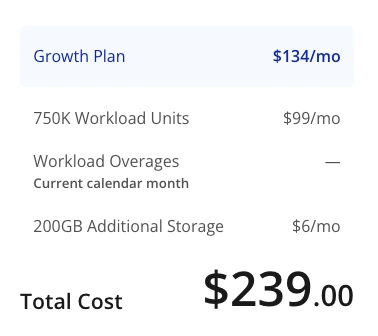
Running cost drops: ~$625/mo on Bubble vs ~$350 custom code
| Bubble version | Custom version | |
|---|---|---|
| Platform | $134 plan, plus overages, about $200 | Vercel $25 and Supabase $25, so $50 |
| Storage | close to the plan ceiling | included |
| AI provider | ~$450 | ~$300 |
| Total | about $625 a month | about $350 a month |
The AI bill fell while I was testing the custom code version. Better caching, smaller images sent to the model, and a check that only re-runs a job when the first result is poor.
Those two totals move in opposite directions from here. The Bubble bill climbs as usage grows. The custom bill doesn't move much.
The transition: no downtime, data moved in one shot
About 50 users, in beta at the time.
Version 2 stayed live while version 3 (the custom code one) was built. I moved the domain across. No downtime. Users opened the app the next day and found a better product.
The data was small enough to move in one go. A larger app takes more care, as the section above explains.
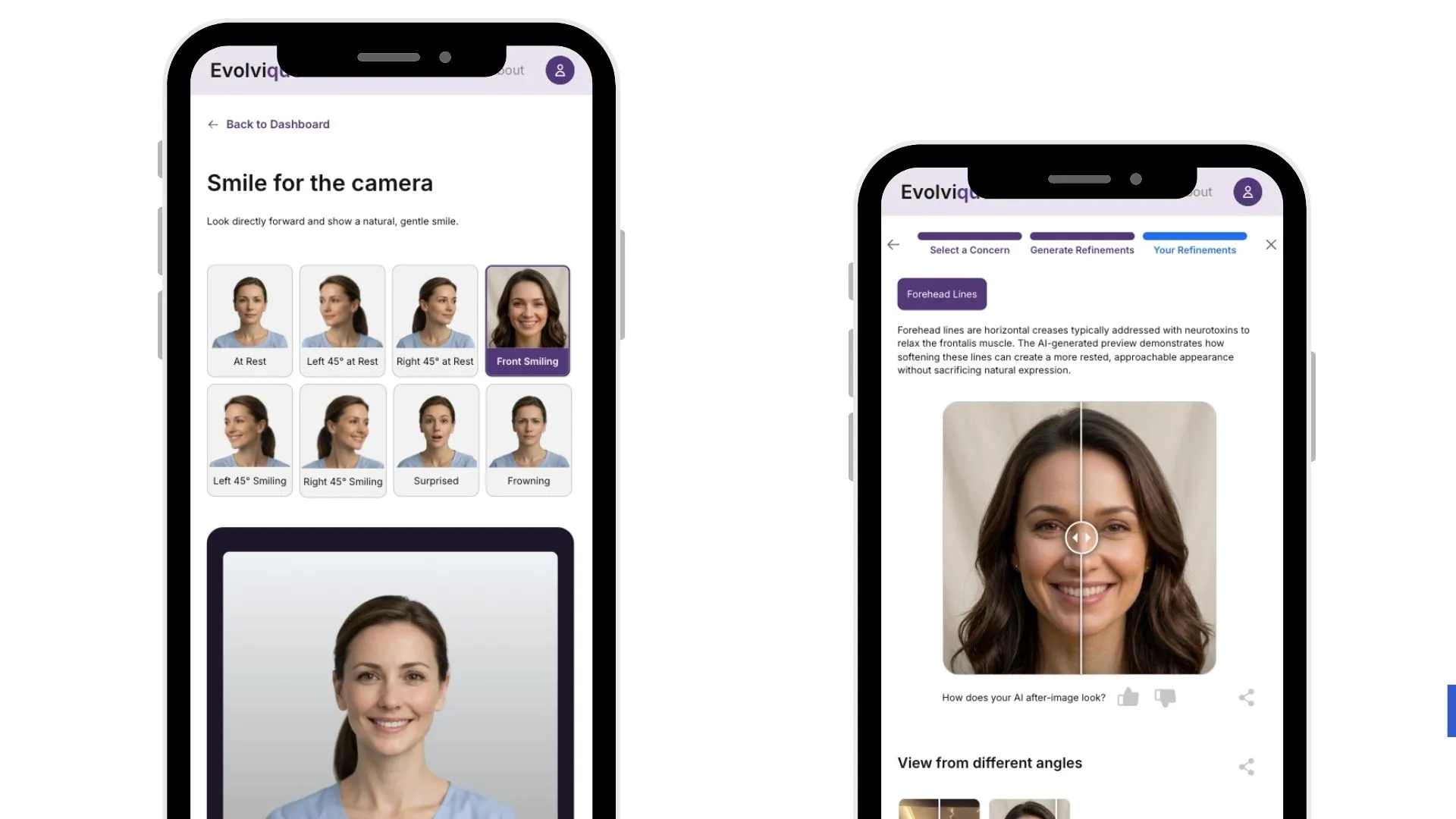
A couple of the real Bubble rebuilds from my portfolio:

How I rebuild apps
8 stages. Three weeks from the first call to your users seeing the new app. Ten of those days are writing code. The other eleven days are what makes it possible to write the app in 10 days.
- 1Discovery
- 2Spec & prototype
- 3Stack
- 4Foundations
- 5Build · 10 days
- 6Transition day
- 7Support · 2 wks
- 8Handover
| Stage | What I do | What you do |
|---|---|---|
| 1. Discovery | One call about your product and your business | Talk to me |
| 2. Spec and prototype | Write the requirements, build a clickable version | Review it, three or four rounds |
| 3. Stack | Choose the framework, hosting, database and storage | Nothing |
| 4. Foundations | Design the database and the server | Create your accounts together, add me as a collaborator |
| 5. Build | Write the app. Ten days. | Help me test once the build is complete |
| 6. Transition day | Move your data, point your domain at the new app | Inform existing users |
| 7. Support | Fix any issues that users find. Two weeks. | Test it, tell me |
| 8. Handover | Hand over the codebase and set up the tools for you | Nothing |
What this asks of your time.
Not much. About an hour for the discovery call, roughly two hours total across reviewing the prototype and the requirements and giving me feedback, half an hour on a call to set up your accounts, and about two hours of testing near the end. Call it a working day, spread across three weeks.
Stages 1 and 2: from a first call to a clickable prototype
Stage 1. Discovery
One call. We talk about your business as much as your product.
Founders often describe the thing they think they need. It is usually a little different from the thing they want. Finding that difference is the most valuable part of the whole project.
For a rebuild this call can be slightly shorter, because your Bubble app already answers most of the questions.
Stage 2. The spec and the prototype
Two things come out of this stage.
A requirements document. What the app must do. The rules and logic behind the visuals. How payments work. The things that happen behind the scenes.
A clickable prototype. A real HTML file with mock data you open in your browser and click through. Not wireframes. Real text. Real colours. Real branding. The actual screens, with the actual UX.
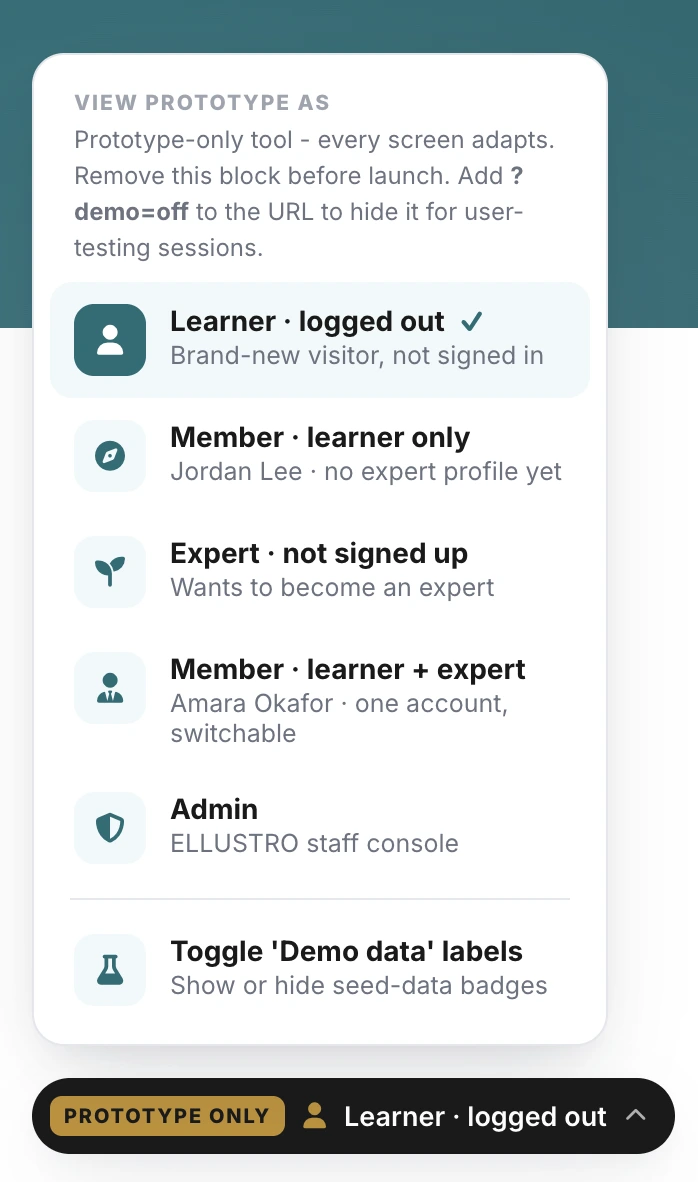
For a rebuild I start with your Bubble app's flows and improve it. Most founders build for function first, which makes sense when you are proving an idea, and it is a great reference. This prototype stage in my process is where your product finally gets to look good.
This takes three or four rounds on average. I stop when you say yes, that is it. The spec and prototype get locked in.
Why I spend this long here. Once you have approved a prototype and a spec, there is nothing left to argue about while I build. That is the reason stage 5 only takes ten days. I have a reliable source of truth and everything going forward makes use of it.
Stage 3: choosing your stack
Most of my rebuilds end up on Next.js, Supabase and Vercel. That's because of the nature of most apps I happen to work with, not a blind preference.
The framework the app is built with. (What canvas and workflows do on Bubble)
The database. It stores your data, handles logins and holds your files. (What database and option sets do on Bubble)
Where the app runs. (The actual deployment)
But this stack is where I usually land. I never start with this in mind. Sometimes I land on other options for the stack: Cloudflare, Render, Railway, Redis, etc. There are unlimited options (a blessing and a curse!).
The real question is what happens on your server. Vercel is cheap and fast for apps that do short jobs. If your app runs a task for ten minutes before it finishes, Vercel is the wrong home. Then I look at Railway, Render and their equivalents instead.
Storage follows that same approach. I have used Supabase storage on some builds, Cloudflare R2 on others, AWS S3 on some and so on. What matters is which one fits the rest of your setup.
Your database is usually Postgres, through Supabase. Sometimes I add Redis. Sometimes I use whatever database your host already offers, to keep the number of moving parts low.
I decide all of this against how many users you expect, the nature of your build, and what you can afford to run each month. Then I write it down, before anyone opens a code editor. Sometimes this decision requires me to run some tests and make a final decision with the results I find. But what gets decided here stays decided throughout.
If a studio names your stack before they understand your app, they are selling you their template.
Stages 4 and 5: foundations, then ten days of building
Stage 4. Foundations
Three pieces of work, and they happen together.
- Design the database. The tables, the links between them, the security rules.
- List every server endpoint. An endpoint is one job the server can do. Save a booking. Send a message. Charge a card.
- Map each screen to the endpoints it calls.
This goes back and forth a few times. The screens have to fit the server. The server has to fit the screens. You only find the mismatches by trying.
When this stage ends, I know exactly what every part of the app must do. What goes in. What comes out. What happens when it fails.
This is also where you set up your accounts. Another call, and we set things up together. Supabase, Vercel, GitHub, Stripe, and/or whatever else your app needs. You create every account, and add me as a collaborator.
Every line of code I write from here lives in accounts you own. Not mine. This is the point of the whole project, and it happens before I write anything.
Stage 5. The build
Ten days. I write the functions, one at a time, against the plan from stage 4.
Shared code gets pulled out the second time I need it, rather than planned in advance. Outside services get connected when the screen that uses them is ready to test. Each one sits behind my own wrapper, so swapping a provider later is a small change instead of a rewrite.
Where AI helps me, and where it does not
The prototype in stage 2 is almost entirely written by AI. It is one HTML file that shows a flow. There are no meaningful architecture decisions inside it. So the speed gain is large and the risk is basically zero.
It makes a difference that I create the prototype rather than have a ready-made one handed to me. The process of creating it lets me understand the product a lot more than just the discovery call.
Stage 5 is different. Every decision that shapes the app is made by a person. The database. The endpoints. The screen map. The error handling. All of that is stages 3 and 4, and all of it is human.
By the time I write code, each function already has a written job. The AI just does the writing. It's doing the typing I would have done by hand, and it types far faster than any person I know!
That is the whole difference, and it is why I can say ten days without claiming magic.
I usually have a few days for testing at the end of the build sprint. I run code tests, automated end-to-end testing as well as manual end-to-end testing. It really helps to have you help me with some testing of your own at this point. And I wrap up any loose ends on the build.
Note: this is NOT vibe coding.
Not even close. Vibe coding means describing what you want and asking the AI to decide the architecture and then build it accordingly. Then you do it again the next day, on top of a structure you cannot see or understand. Every change adds problems you have no way to spot.
If your app is going to real users, DO NOT build that way. There are countless horror stories of vibecoded apps that have security and data leaks leading to lawsuits. I want you to build a great business, so let's build assets and avoid potential liabilities!
Stage 6: transition day
Your old app stays live and untouched during the entire build. The new one is built alongside it, on totally separate infrastructure.
Transition day goes like this:
- I copy your data across.
- I point your domain at the new app.
- Your users open it and see a better product. You may get some customer complaints with caching issues for 48h post-transition (which is expected).
- Your Bubble app stays up, with its data and logins, until you are happy. Then you delete it.
There is no downtime.
To go back to the old app, you point the domain at Bubble again. That takes minutes.
Your SEO pages carry over.
I keep any SEO pages worth keeping, and I hold the exact same URL paths for them. So after the transition there are no broken links, and you keep your search rankings.
A warning: switch back, and you lose new data.
Going back protects your app. It does not protect the completeness of your data. Anything a user does after the transition only exists in the new app. Go back, and you lose it. You can do a reverse migration though subject to feature compatibility. So it's not all bad, it's just a bit limited.
Your new features will have no history
A rebuild usually adds data your old app never held. New tables, new columns, new fields.
So when a newly transitioned user looks back at their activity on the rebuilt app (a dashboard, a history page, a list of past orders), they may see a gap. Again, that is expected. Every real migration has this. Almost nobody writes about it.
Programmatically filling in all that history is potentially expensive and mostly wasted. Users only care about a small part of it.
A better approach: give people a button to run the new features on the old records they care about. It costs less, it is honest, and it turns a gap into a tour of what is new.
Stages 7 and 8: support, then the handover
Stage 7. Two weeks of support
Real users find things that testing does not. I stay with you for two weeks after you go live.
Small changes are included. Anything that goes well beyond the agreed spec becomes its own mini project, separately quoted and worked on asap.
Stage 8. Handover, and why I set it up this way
There is no big handover moment, because there is nothing to hand over. Your accounts were created at stage 4. Everything has been built inside them from the first line of code.
What happens instead: I connect the codebase to your PC/workstation, then hook up Claude Code or Cursor to it, and show you how to make small updates and push them to the live codebase. Text, colours, button labels, a new marketing page. None of that touches the architecture, and you should not have to pay anyone to do it.
I stay available for the bigger things. Some clients take my Care plan, some come back for one maintenance project at a time.
Why this matters. Think about why you are leaving Bubble. Your product lives in someone else's account, on someone else's terms. Swapping that for an agency who holds your code is not an improvement. If you fired me halfway through the build, you still keep everything.
Want to see what your own rebuild looks like?
On one call, I will go through your app, your timeline and your price.
When I am the wrong choice
If you want to be the builder
Some founders want to own the product. Some want to build it themselves, every day, for years.
If you are the second kind, I recommend staying on Bubble. As long as you study its best practices properly first.
Bubble gives you good building blocks and leaves you to join them together. That is a skill you can learn without looking at code, and there is a limited number of right answers.
Writing code with AI gives you unlimited options and no guardrails. And you don't have the ability to make the right choices for your specific scenario. The common failure is asking the AI to decide how to build something and then build it, in one step, when you have no way to judge the answer.
It's like the time I hired a marketing head in my early years without knowing what good work looked like. They worked hard and I paid them but the results were basically zero. Avoid that mistake with AI.
A small set of known choices beats an unlimited set of invisible ones.
To be clear, changing text and colours is not building. You get that on custom code too, as stage 8 explains.
If you are building for a million users or more
I am not the right fit (yet), and I will say so on the first call. Then I will point you to someone who is.
That is a multi-million dollar engineering project and you deserve a team with experience doing that.
Honestly ranking your options
If you're choosing how to build a product that real people will use, this is my honest recommendation in order of preference:
- 1Hire world-class developer(s) into your team.
- 2Work with me.
- 3Bubble, only after you study its best practices properly.
- 4Vibe coding.
- 5Bubble's AI features. The worst option, because you are giving instructions to a system you cannot inspect, inside a platform you cannot leave.
Everything after #3 here is a bad idea. I'm still leaving it in the list because you've probably heard of it, and I want to show you where it stands.
No-code did not lose to vibe coding. No-code lost to AI-assisted coding done by people who really know how the app is built.
AI runs inside Bubble. The parts of AI that reach beyond what Bubble allows (in red) get cut off.
A human who knows the build directs it. Often they make full use of AI, so nothing gets cut off.
Common questions
Can I export my Bubble app as code?
You can export it, but not as code. In Bubble, go to Settings, then General, and download the JSON (.bubble) file of your pages, workflows and settings, on a Growth plan or above. It contains no HTML and no JavaScript, so nothing in it can run. It describes your app in a format that Bubble understands and can reproduce from. It is not your app.
How long does a rebuild take?
Three weeks from the first call to launch, for most apps. Five weeks for a complex one. The second half this time is spent writing code. The first half is discovery, the prototype and the plan. Then two weeks of support after this period is over.
How much does a rebuild cost?
$4,000 to $15,000, depending on complexity and how many users you are planning for. Many quotes in the market are much higher. If you were quoted $50,000 for a fairly standard app, ask someone else to check it.
Will my users lose their accounts?
Their accounts move across. Their passwords cannot, because Bubble scrambles them in a way nobody can reverse. Every user sets a new password on transition day. Plan to inform your transitioning users accordingly.
Is there downtime?
No. Your old app stays live during the whole build. The new one runs beside it. The transition is a domain change, and switching back takes minutes.
What happens to my data?
It moves. Export to CSV, adjust the format, load into the new database. Simple for small datasets. Above 200,000 rows it needs batching and more care. But it's a straightforward process overall.
Should I use Bubble's AI features instead?
I advise against it. You are giving instructions to a system you cannot inspect, inside a platform you cannot leave. When it makes a mistake, that mistake lands inside Bubble and is expensive to undo by hand.
Can I just fix my Bubble app instead?
Often, yes, and you should check before spending on a rebuild. Most surprise bills come from nested searches, long unpaged lists and a badly shaped database. But if your usage comes from machines rather than people, fixing will not help. Fixing it also keeps you on a platform you cannot see inside and cannot leave easily. You are spending money to improve something you do not control. So fixing it is effectively just delaying an inevitable rebuild.